|
|
|
Automotive Aftermarket Electronic Catalogues |
|
|
|
Automotive Aftermarket Electronic Catalogues |
Part Number Section
|
Part List Area |
||
|
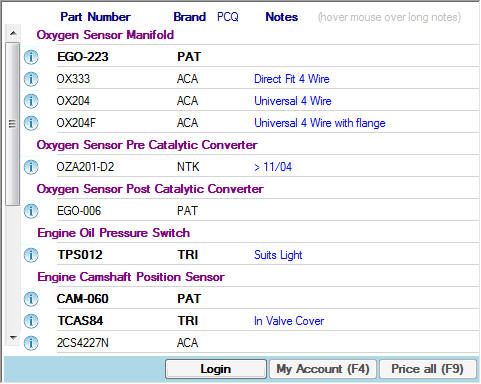
The 'Part Headings' are shown in purple.
3. PCQ
- Per Car Quantity
|
||
|
|
||
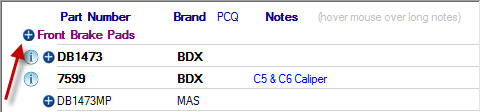
| In certain sections of the catalogue only the Primary Brand will be shown. In these cases if there is a secondary brand a '+' button will be displayed next to the 'Part Heading', as shown below. | ||
|
|
||
|
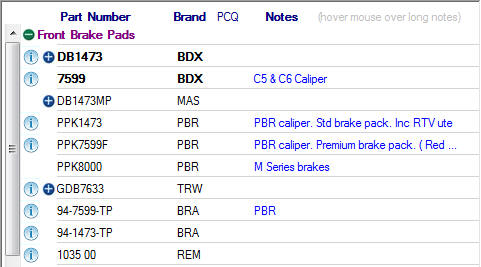
Clicking on the '+' button will expand out the 'Parts List' under that 'Part Heading' to show all Brands. Once clicked the button changes to a '-' button, clicking this will hide the secondary Brands. |
||
|
|
||
|
|
|
|
|
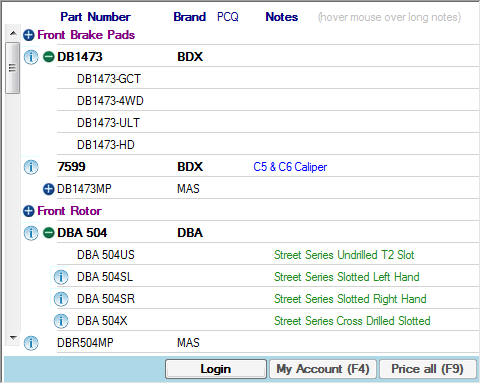
In the above image you can see the there is a second '+' button next to each of the 'Part Numbers'. This indicates that there is an optional upgrade part or children parts of a master part available for that 'Part Number'. Once again clicking the '-' button will hide the optional upgrade parts. |
||
|
|
||
|
|
|
|
|
The last button on the 'Part Number' Line is the 'i' button. This is the Info button
which when clicked will display any 'Images' and/or 'Dimensions' that are on file
for the 'Part Number' on the right hand side of the screen as shown below. |
||
|
|
||
|
|
||
|
|
||
|
Also on the 'Image/Dimension' section on the right there is a 'Tick Box' for 'Holding
Part for Comparsion'.
|
||
|
|
||
|
© 2010 Autoinfo PTY Ltd |